TIA Openness Manager
TIA Openness mit KI-Workflows, jetzt AnyAutomation Studio
Das Werkzeug zum Exportieren, Vergleichen und Generieren von TIA-Portal-Bausteinen über TIA Openness ist zu AnyAutomation Studio geworden, einer Automation-Engineering-IDE, in der ein KI-Assistent mit Projektkontext direkt am TIA-Portal-Projekt arbeitet, von V15 bis V21. Der Download ist AnyAutomation Studio, bestehende Konten melden sich weiter wie gewohnt an.
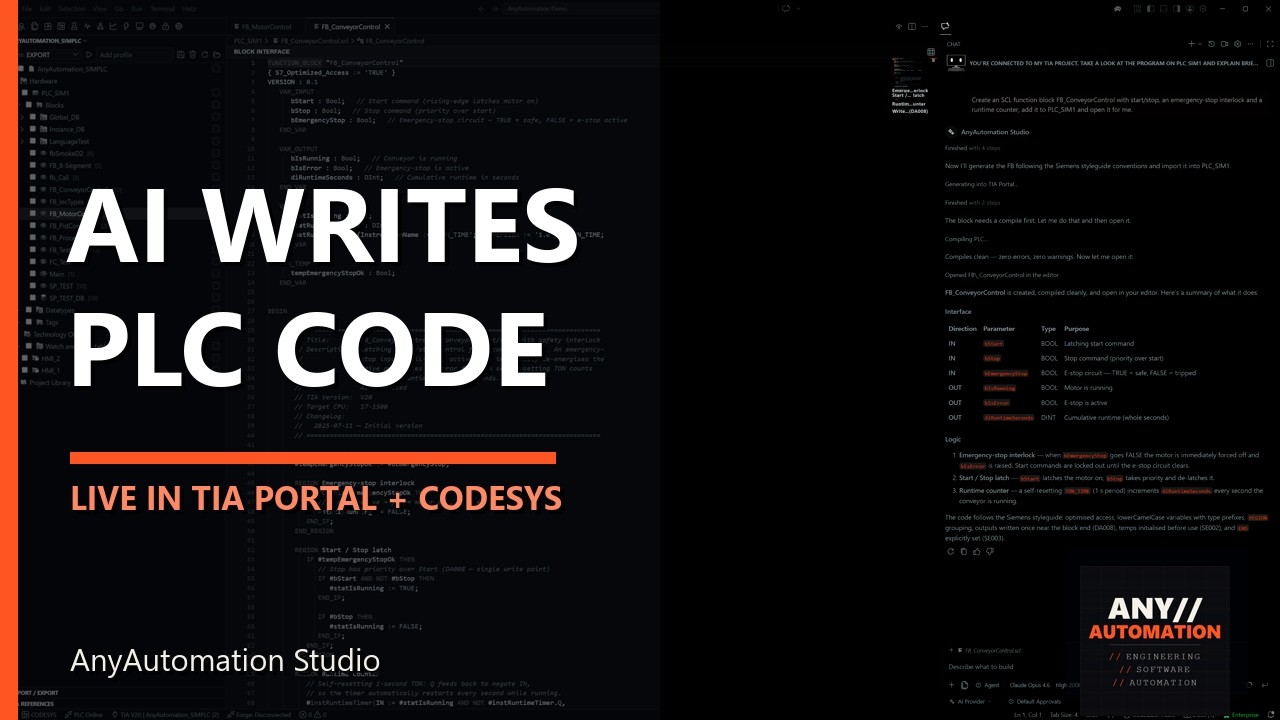
Vier Schritte, ein Kreislauf, alles über TIA Openness
Der KI-Workflow für TIA Portal
Export über TIA Openness
Bausteine, Variablentabellen und HMI-Inhalte verlassen das Projekt als XML- und SCL-Dateien mit ihrer Ordnerstruktur, S7DCL ab V20 inklusive, die Hardware-Konfiguration als AML. Der Exportordner ist die Arbeitskopie für KI, Diffs und Git.
Die KI versteht das Projekt
Chat mit Projektkontext: Der Assistent liest Bausteine, erklärt und dokumentiert Programmlogik und findet mit der Projektsuche jede Verwendung einer Variable.
Die KI generiert, prüft und testet
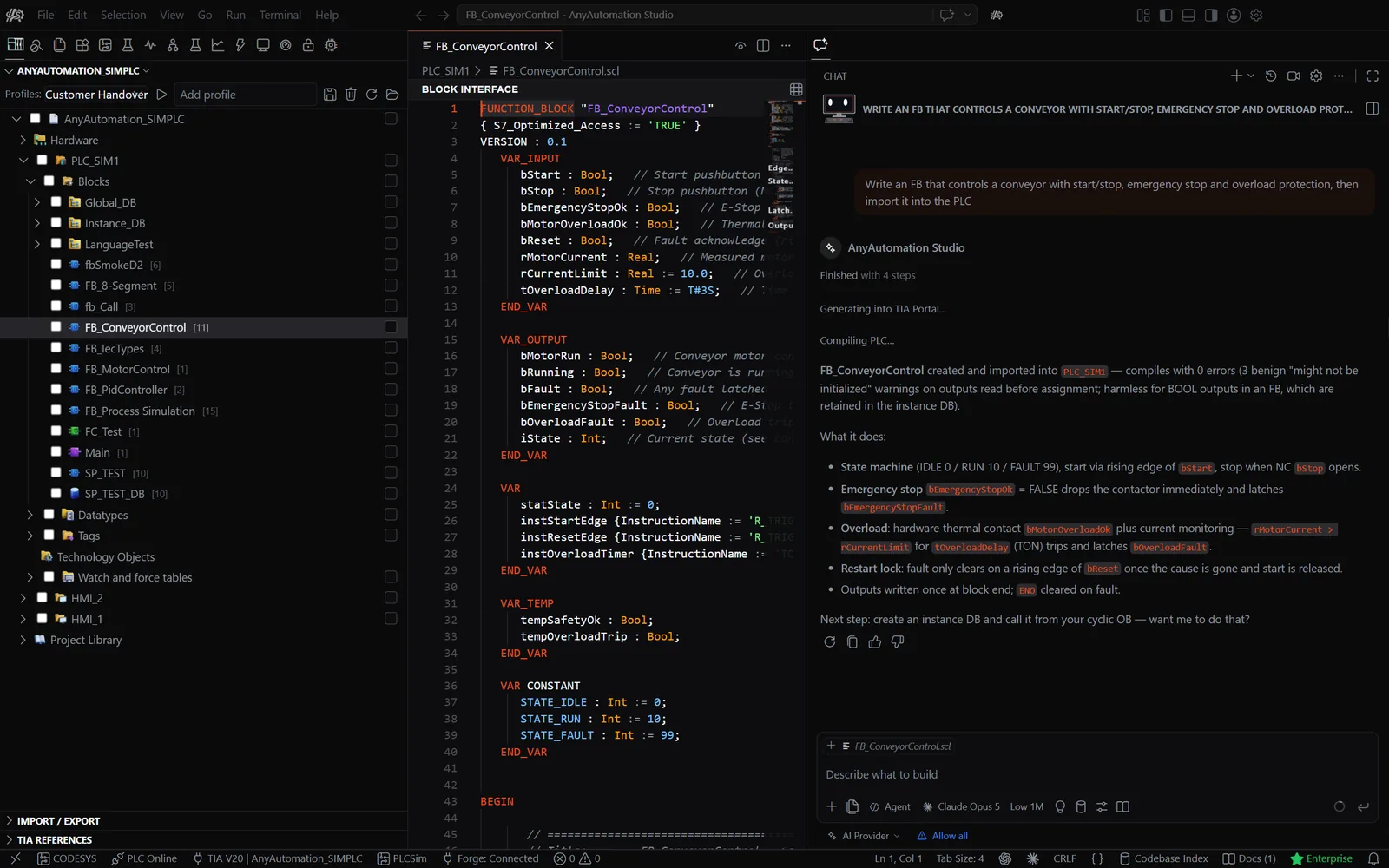
SCL-Bausteine aus einer Beschreibung mit den echten Variablennamen deines Projekts, AWL nach SCL konvertiert, ein Review gegen den Siemens-Programmierstyleguide und Unit-Tests auf PLCSIM Advanced oder einer echten S7-SPS.
Import zurück über TIA Openness
Jeder Import zeigt eine Diff-Vorschau und wartet auf deine Bestätigung. Danach kompilieren, Projekt gegen Exportordner vergleichen und das Ergebnis in Git committen.
TIA Openness Fähigkeiten
Was AnyAutomation Studio über TIA Openness kann
Import und Export über TIA Openness
Bulk-Export und -Import mit Ordnerstruktur, als XML und SCL, S7DCL ab V20, WinCC Unified inklusive. Die KI exportiert, ändert und importiert Bausteine auf demselben Weg, immer mit Diff-Vorschau.
- Ausgewählte Objekte oder das ganze Projekt exportieren und importieren
- Diff-Vorschau mit Tri-State-Auswahl
- Kompilieren nach dem Import mit Status pro Baustein
- Geschützte Elemente, die Import All überspringt
SCL mit KI generieren
Der Assistent kennt dein Projekt und schreibt SCL mit dessen Variablennamen und Datentypen. Er konvertiert AWL nach SCL, prüft Code gegen den Siemens-Programmierstyleguide und vervollständigt beim Tippen inline.
- Claude, GPT, Gemini, Grok und weitere Cloud-Anbieter
- Lokale Modelle über Ollama, LM Studio, vLLM und SGLang
- Experten-Agenten und Skills
- Eigener API-Key, kein Umweg über AnyAutomation-Server
Vergleichen und Suchen
Der Compare Editor zeigt zwei Projekte oder Projekt und Exportordner Baustein für Baustein und merged Unterschiede zurück. Die Projektsuche findet und ersetzt im ganzen Projekt, Variablentabellen inklusive.
- Projekt gegen Projekt oder Exportordner
- Unterschiede Baustein für Baustein zurückmergen
- Suchen und Ersetzen bis in die Variablentabellen
- Textsuche in grafischen Bausteinen ab V20
Git und CI/CD
Integrierte Quellcodeverwaltung für den Exportordner: Stagen, Committen, Branchen und Synchronisieren, die Commit-Nachricht schreibt die KI. Versionierte XML- und SCL-Exporte und ein Kommandozeilen-Testrunner verbinden TIA Portal mit deiner CI/CD-Pipeline.
- Stagen, Committen, Diff, Branches, Sync
- KI-Commit-Nachricht
- Versionierte XML- und SCL-Exporte
- Kommandozeilen-Testrunner für Pipelines
PLC Online und OPC UA
Live an die Steuerung, ohne TIA Portal offen zu haben: OPC UA Client und S7-Treiber, Adressraum-Browser, Beobachtungstabellen und Live-Werte direkt im SCL-Editor. Trace zeichnet Signale auf wie ein Oszilloskop.
- OPC UA Client und nativer S7-Treiber
- Adressraum-Browser und Beobachtungstabellen
- Live-Werte im SCL-Baustein-Editor
- Trace mit Triggern und CSV-Export
Unit-Tests und Know-how-Schutz
SCL-Unit-Tests laufen auf PLCSIM Advanced oder einer echten S7-SPS, die Suites schreibt die KI auf Wunsch. Der Passwort-Tresor hält Know-how-Schutz-Passwörter AES-256-verschlüsselt, Find Unused räumt unreferenzierte Bausteine auf.
- Unit Testing auf PLCSIM Advanced oder einer echten S7-SPS
- KI-geschriebene Test-Suites
- Passwort-Tresor mit AES-256, Schutz und Freigabe im Bulk
- Find Unused mit Bereinigung
KI in AnyAutomation Studio
Die KI arbeitet am Projekt, nicht daneben
KI-Werkzeuge
Claude, GPT, Gemini und Grok, weitere Cloud-Anbieter, Unternehmens-Clouds wie Azure OpenAI, Google Vertex AI und AWS Bedrock, oder lokale Modelle über Ollama, LM Studio, vLLM und SGLang. Du bringst deinen eigenen API-Key mit, Anfragen laufen nie über AnyAutomation-Server. Der Assistent arbeitet mit diesen Werkzeugsätzen:
Agenten
Delegiert Teilaufgaben an spezialisierte Agenten und führt mehrere Sitzungen nebeneinander aus.
TIA-Portal-Bausteine und Projekt
Liest, generiert, exportiert, importiert und bearbeitet Bausteine, Variablentabellen und den Projektbaum über TIA Openness.
Dateien
Liest und schreibt Dateien im Exportordner und im Arbeitsbereich.
Dokumentation
Durchsucht Dokumentationsseiten, die du hinzufügst, etwa Herstellerhandbücher und Normen.
EPLAN
Liest Daten aus EPLAN Electric P8 und leitet daraus Variablentabellen und Hardware-Topologie ab.
OPC UA
Durchsucht den Adressraum, liest und schreibt Werte und beobachtet Live-Daten auf der Steuerung.
Forge
Durchsucht deine Bausteintyp-Bibliothek, erfasst Typen aus einem Projekt und rollt sie in eine verbundene SPS aus.
SCADA
Erzeugt aus dem Projekt ein lauffähiges Web-SCADA.
Trace
Startet Signalaufzeichnungen und wertet aufgezeichnete Traces aus.
Canvas
Baut interaktive Dashboards und Übersichten mit Anzeigen, Diagrammen und Bedienelementen aus dem Chat heraus.
Unit-Tests
Schreibt Test-Suites, führt sie auf PLCSIM Advanced oder einer echten S7-SPS aus und liest die Ergebnisse.
Visueller Kontext
Sieht sich Anwendungsfenster an und klickt oder tippt nach deiner Bestätigung in den Anwendungen, die du freigibst.
Inbetriebnahme
Füllt den Inbetriebnahme-Report mit Stationen, IO-Checkliste und Live-IO-Checks.
Sub-Agenten und Best-of-N
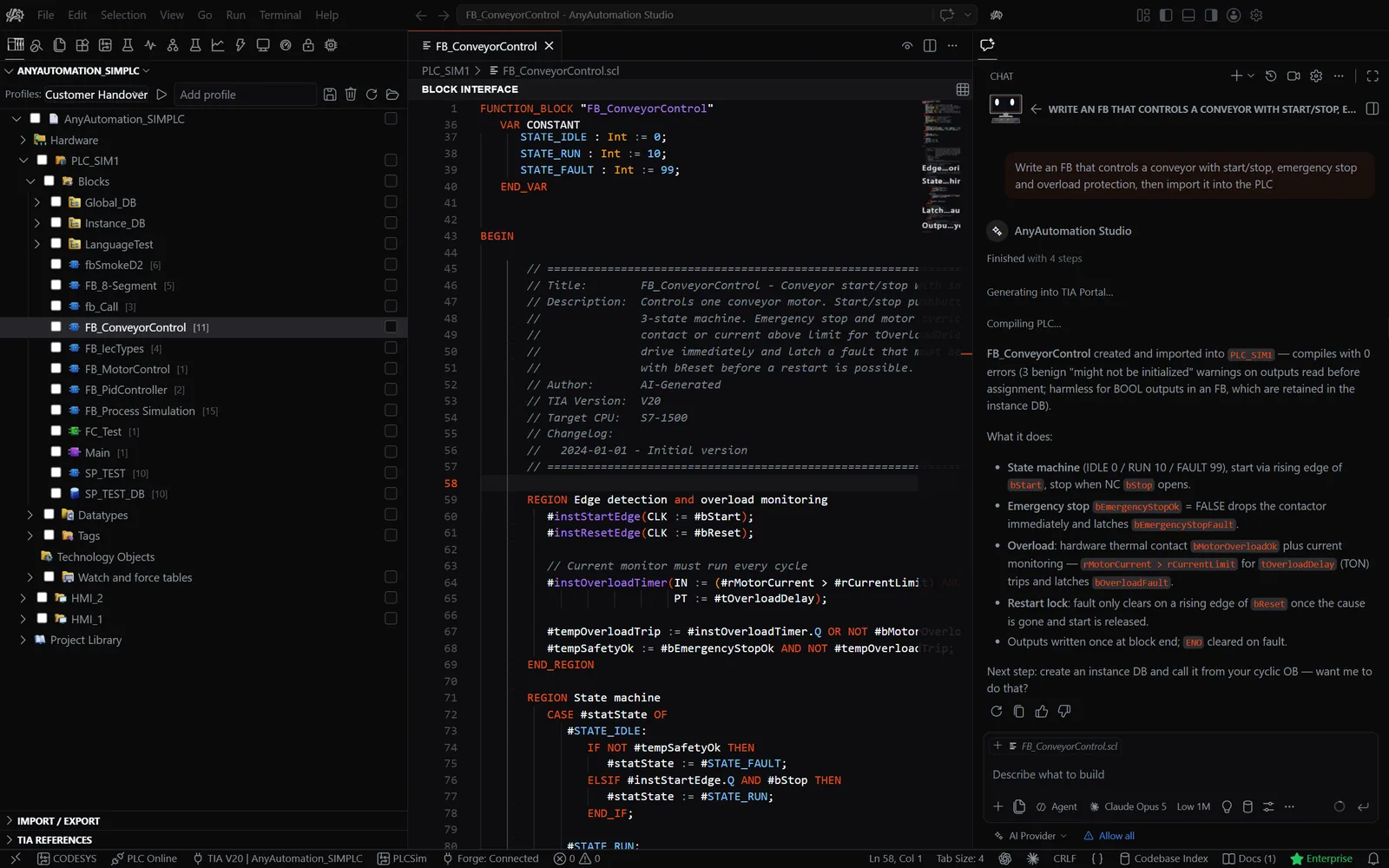
Der Assistent delegiert Teilaufgaben an spezialisierte Agenten; Best-of-N führt denselben Prompt in zwei bis fünf parallelen, isolierten Sitzungen aus, damit du das beste Ergebnis behältst.
MCP-Client
Verbinde externe MCP-Server und nutze ihre Werkzeuge neben den eingebauten TIA-Portal-Werkzeugen. AnyAutomation Studio ist der Client, nie ein Server für dein Projekt.
Import mit Bestätigung
Generierter Code geht erst über TIA Openness zurück ins TIA Portal, wenn du die Diff-Vorschau gesehen und bestätigt hast.
Clips und Screenshots aus der aktuellen Version
AnyAutomation Studio in Aktion
Projektsuche - AnyAutomation Studio
Projektsuche
Suchen und Ersetzen im ganzen TIA-Portal-Projekt, Variablentabellen inklusive
Compare Editor - AnyAutomation Studio
Compare Editor
Zwei Projekte Baustein für Baustein, mit Zurückmergen
KI
KI-Chat mit Projektkontext
Programmlogik erklären und dokumentieren, SCL generieren, AWL konvertieren, mit Bestätigung vor jedem Import
- Kennt Bausteine, Variablen und Projektstruktur
- Erklärt und dokumentiert Programmlogik
- Generiert SCL und konvertiert AWL
- Bestätigung vor jedem Import
KI-Chat mit Projektkontext - AnyAutomation Studio
TIA Openness
Import und Export
Diff-Vorschau zwischen Projekt und Exportordner, Tri-State-Auswahl, Kompilieren nach dem Import
- Ausgewählte Objekte oder das ganze Projekt, Ordnerstruktur bleibt
- XML und SCL, S7DCL ab V20
- Diff-Vorschau mit Tri-State-Auswahl
- HMI-Inhalte und Hardware inklusive
Import und Export - AnyAutomation Studio
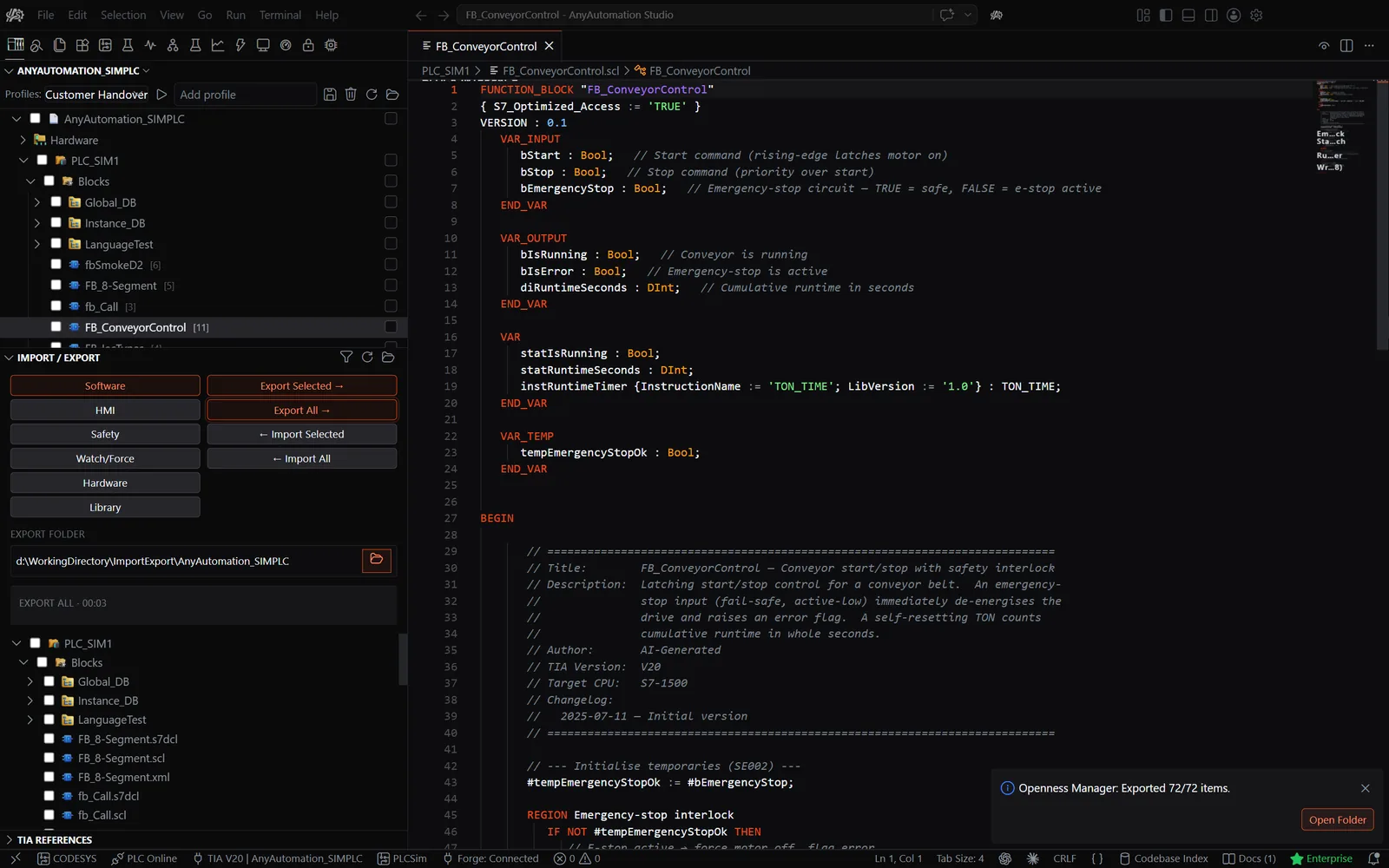
PLC Online
Live-Werte im SCL-Editor
Online gehen und jeden Wert direkt im Quelltext beobachten, mit Vergleichs-Badges pro Baustein
- Online gehen direkt aus dem Baustein-Editor
- Aktueller Wert jeder Variable im Quelltext
- Online-Offline-Vergleichs-Badges pro Baustein
Live-Werte im SCL-Editor - AnyAutomation Studio
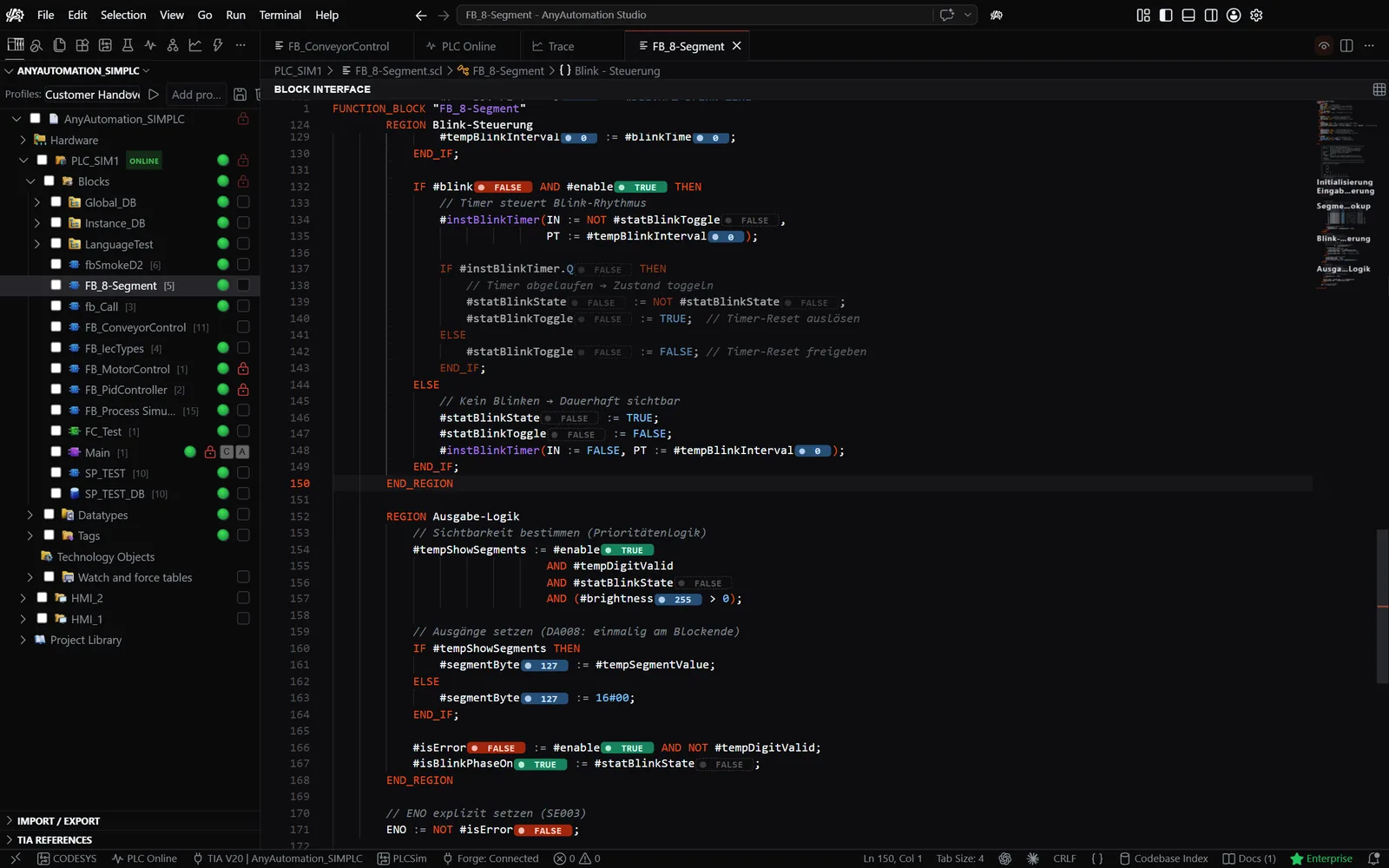
Testing
Unit Testing
SCL-Unit-Tests auf PLCSIM Advanced oder einer echten S7-SPS, Ergebnisse und Assertions in Echtzeit
- PLCSIM Advanced oder echte S7-SPS
- Test-Suites von der KI geschrieben
- Ergebnisse, Assertions und Fehler live
- Verlauf und Trends der Testläufe
Unit Testing - AnyAutomation Studio
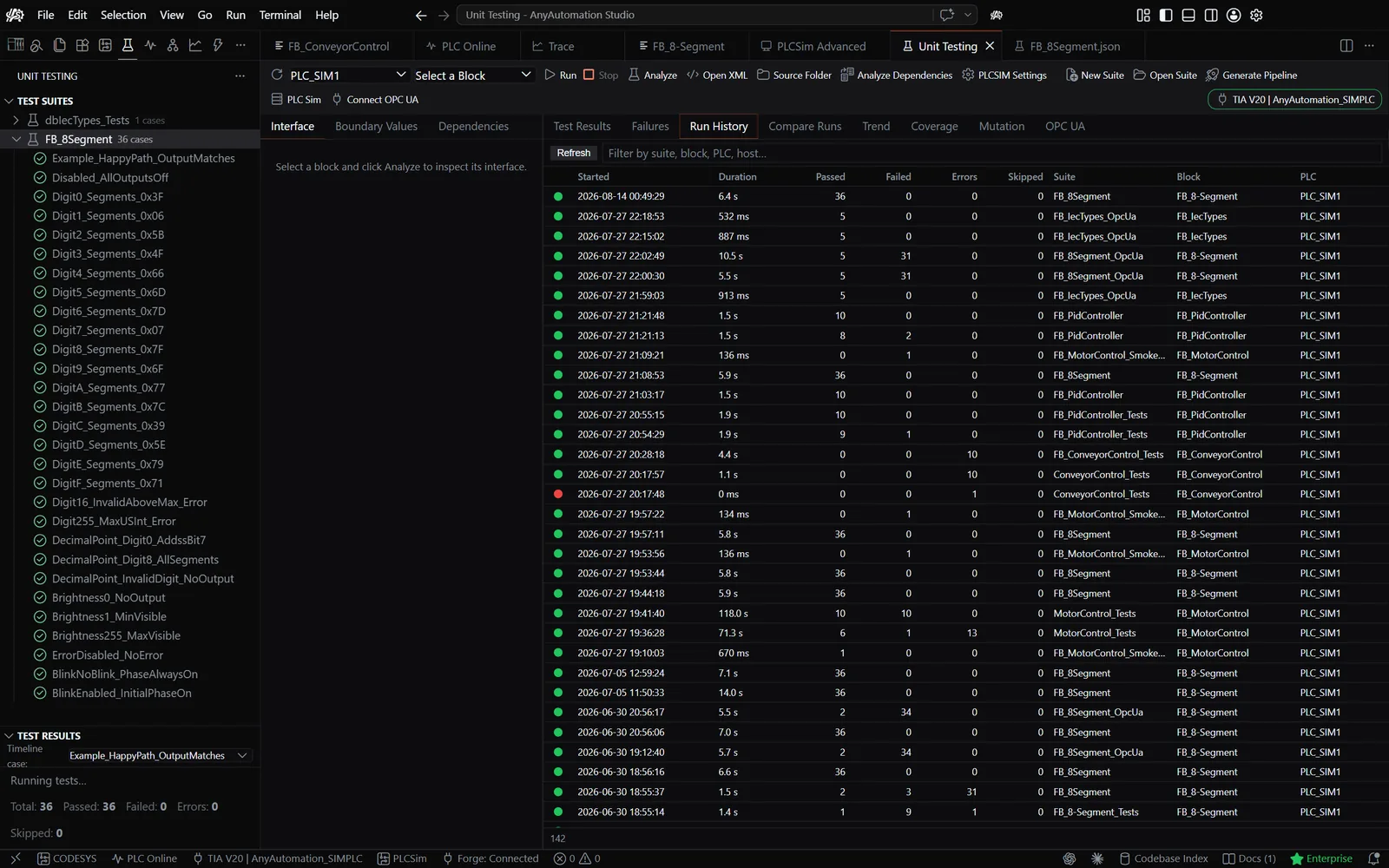
Konnektivität
OPC UA Client
Adressraum browsen, Variablen lesen und schreiben, Beobachtungstabellen, ohne TIA Portal
- Adressraum durchsuchen
- Variablen lesen und schreiben
- Beobachtungstabellen mit Live-Abonnements
- Nativer S7-Treiber als Alternative
OPC UA Client - AnyAutomation Studio
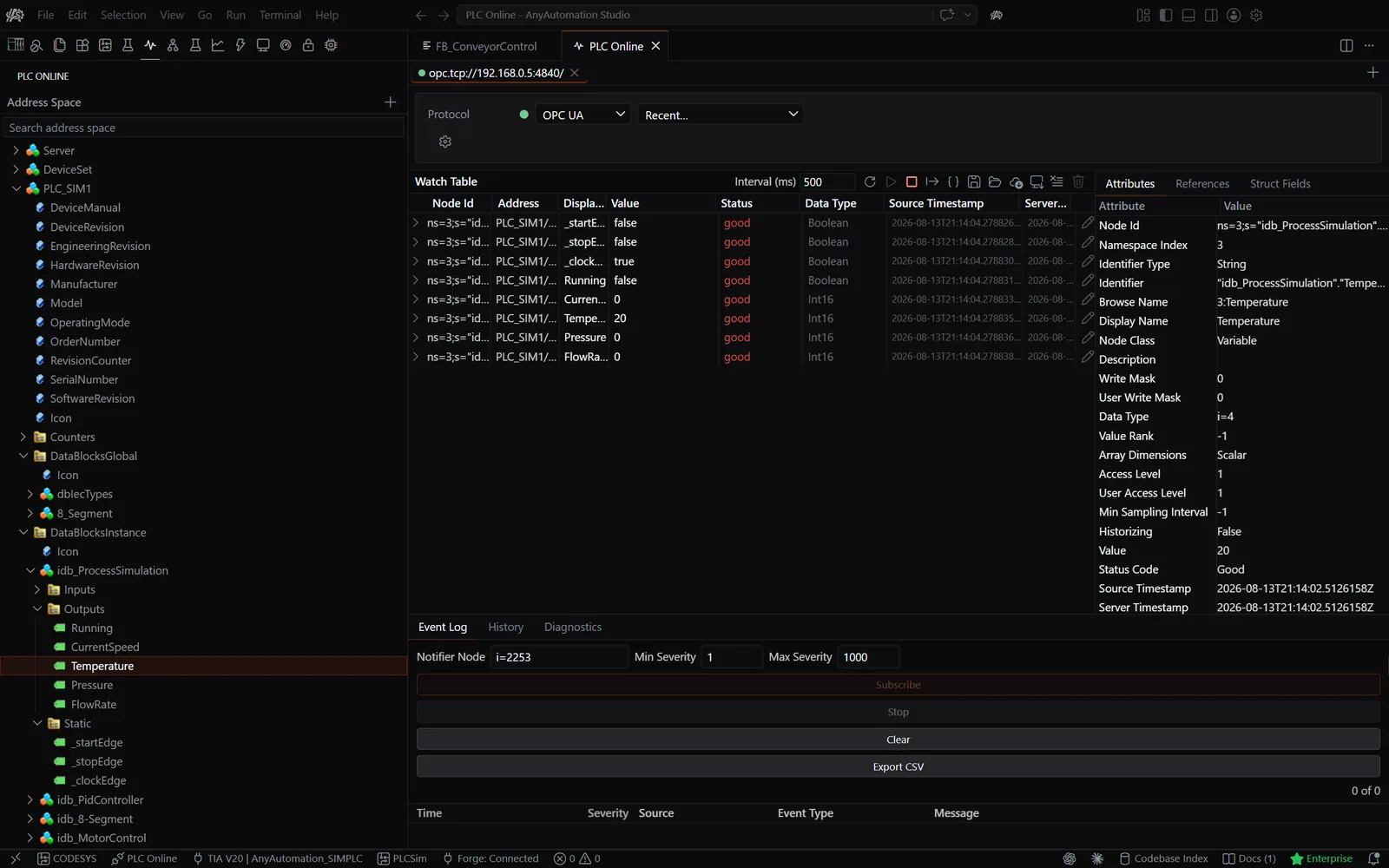
Editor
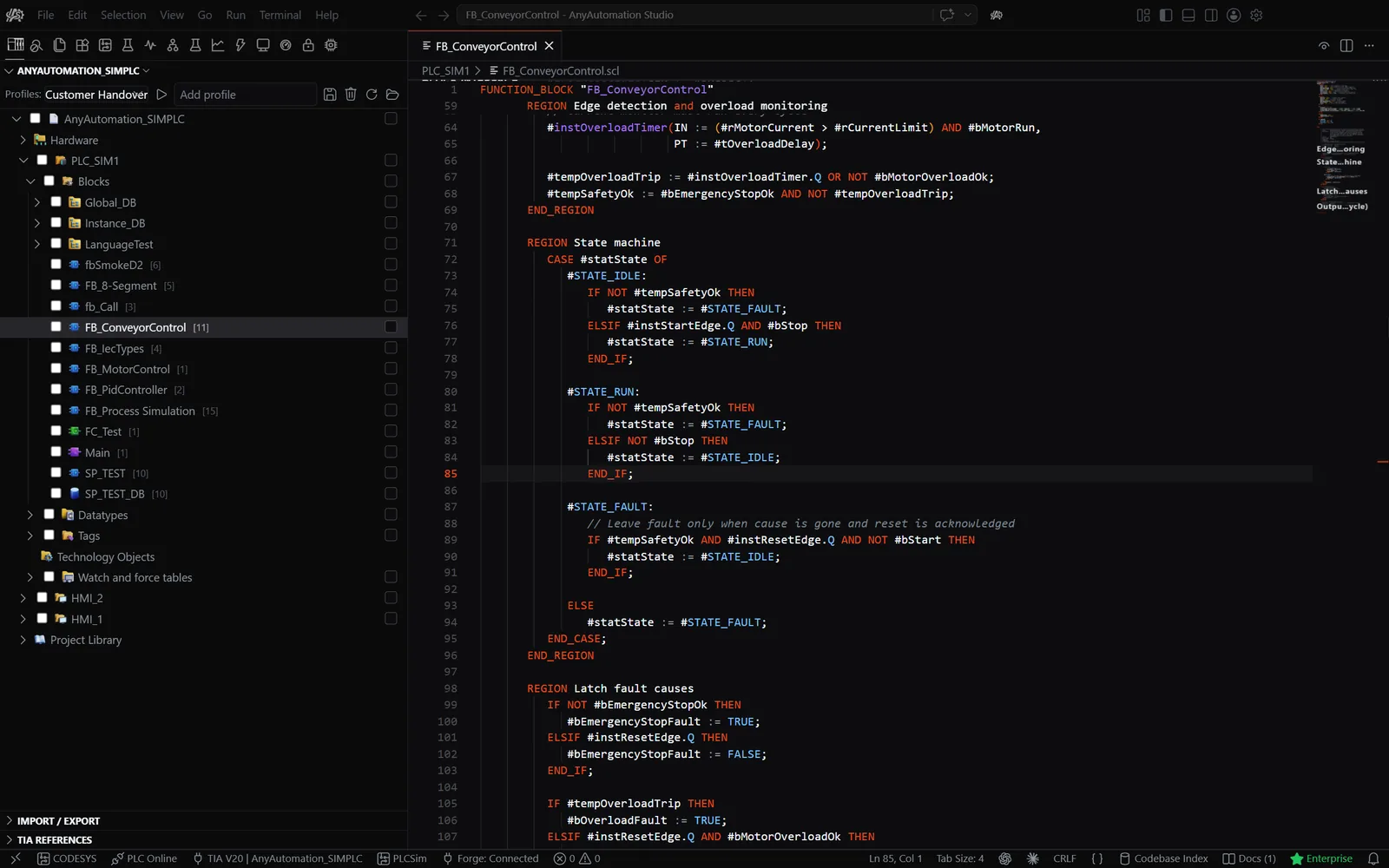
SCL-Editor
Baustein-Quellcode mit Syntax-Highlighting, Kompilierdiagnose und Inline-Vervollständigung
- SCL-Syntax-Highlighting
- Baustein-Quellcode aus dem Projektbaum öffnen
- Kompilierdiagnose im Problems-Panel
- Inline-KI-Vervollständigung, mit Tab übernehmen
SCL-Editor - AnyAutomation Studio
Git-Workflow
Wie Teams mit Git arbeiten
Beliebig viele Entwickler arbeiten parallel am selben Projekt: ohne Sperren, ohne Wartezeit, ohne zentralen Server. AnyAutomation Studio kann die Commit-Nachricht mit KI schreiben, und du kannst den Assistenten bitten, die Änderung vor dem Commit zu prüfen. Der Inbetriebnehmer holt vor Ort exakt den freigegebenen Stand, importiert ihn ins TIA Portal und lädt ihn auf die SPS. Arbeitet dein Team stattdessen in TIA-Multi-User-Sitzungen, öffnet und bearbeitet AnyAutomation Studio auch diese.
Drei Entwickler, drei Branches, ein Projekt
Jeder Entwickler arbeitet auf einem eigenen Branch und committet seine Änderungen unabhängig. Wenn ein Feature fertig ist, prüft das Team es in einem Pull-Request und merged es nach "main". Der Projektleiter setzt für die Inbetriebnahme einen Release-Tag – der exakte Stand ist damit jederzeit reproduzierbar.
TIA Multi-User vs. Git
TIA Portal Multi-User Server
Git mit AnyAutomation Studio
Parallelarbeit
TIA Multi-User: Objekt-Sperren beim Check-out. Wer als Erster auscheckt, blockiert alle anderen am selben Baustein.
Git + AnyAutomation Studio: Echte Branches: Beliebig viele Entwickler arbeiten gleichzeitig am selben Baustein, Konflikte werden beim Merge zeilenweise aufgelöst.
Versionsverlauf
TIA Multi-User: Linear, projektgebunden, an den Multi-User-Server gekoppelt.
Git + AnyAutomation Studio: Vollständige Historie über Jahre rückwärts, Zeile für Zeile, mit Autor und Begründung.
Server-Anforderung
TIA Multi-User: Eigener TIA-Multi-User-Server plus Lizenzen erforderlich.
Git + AnyAutomation Studio: Beliebiger Git-Host: GitHub, GitLab, Azure DevOps, lokaler Git-Server oder USB-Stick.
Offline-Arbeit
TIA Multi-User: Eingeschränkt: Server-Verbindung für Check-out und Check-in nötig.
Git + AnyAutomation Studio: Voll offline arbeitsfähig. Synchronisation, sobald wieder Verbindung besteht.
Was wird versioniert
TIA Multi-User: Nur Objekte des TIA-Portal-Projekts.
Git + AnyAutomation Studio: SPS-Code, HMI, Dokumentation, Konfigurationsdateien und Test-Suiten in einem Repository.
Code-Review
TIA Multi-User: Nicht im Workflow vorgesehen.
Git + AnyAutomation Studio: Pull-Request-Workflow mit Diffs, Kommentaren, Review-Approval und Branch-Protection.
Release-Management
TIA Multi-User: Projekt-Snapshot ohne semantische Versionierung.
Git + AnyAutomation Studio: Git-Tags pro Inbetriebnahme-Stand, semantische Versionierung, klare Release-Notes.
Mehrere Anlagen-Stände parallel pflegen
TIA Multi-User: Schwierig. Der Server kennt nur einen Stand pro Projekt.
Git + AnyAutomation Studio: Pro Anlage ein Branch. Bugfix für alle Anlagen? Einmal committen, per Cherry-Pick auf jeden Anlagen-Branch übertragen.
Werkzeug-Ökosystem
TIA Multi-User: Nur das TIA Portal selbst.
Git + AnyAutomation Studio: Integration in CI/CD, Issue-Tracker, Code-Review-Plattformen und automatisierte Test-Pipelines.
Inbetriebnahme-Stand reproduzieren
TIA Multi-User: "Welche Server-Revision war damals live?" Schwer rückwärts nachvollziehbar.
Git + AnyAutomation Studio: Den Release-Tag auschecken – exakter Code-Stand wiederhergestellt, Zeile für Zeile.
Vom Repository zur SPS: der Inbetriebnahme-Flow
So holt das Inbetriebnahme-Team einen freigegebenen Stand auf den Laptop, lädt ihn auf die physische SPS und dokumentiert den As-Built-Stand zurück ins Repository.
Schritt 01
Release-Tag auschecken
Inbetriebnehmer öffnet das Repository auf dem Laptop und holt den freigegebenen Stand, zum Beispiel "release/anlage-XYZ-v2.1". Der exakte Code ist damit lokal verfügbar.
Schritt 02
Bulk-Import ins TIA Portal
AnyAutomation Studio importiert alle Bausteine, HMI-Elemente und UDTs in einem Schritt über TIA Openness. Die Ordnerstruktur des Repositories wird 1:1 im TIA Portal wiederhergestellt.
Schritt 03
Compile mit Live-Status
Pro Baustein wird der Compile-Status sichtbar. Fehler lassen sich direkt anspringen und korrigieren, bevor die SPS überhaupt angeschlossen wird.
Schritt 04
Download zur SPS
Aus dem TIA Portal wird der geprüfte Stand auf die physische SPS geladen. Die Inbetriebnahme erfolgt mit dem Code, den das Team freigegeben hat. Keine Überraschungen vor Ort.
Schritt 05
Vor-Ort-Anpassungen exportieren
Anpassungen vor Ort – etwa IP-Adressen, Anlagenparameter oder Ad-hoc-Korrekturen – werden zurück exportiert und committet. Der As-Built-Stand wandert ins Repository.
Schritt 06
As-Built-Tag pushen
Der reale Inbetriebnahme-Stand wird mit einem Tag versehen, etwa "as-built/anlage-XYZ". Wenn die Anlage in zwei Jahren ein Update braucht, ist genau dieser Stand reproduzierbar.
Was über TIA Openness läuft
Unterstützte TIA-Portal-Elemente
SPS-Bausteine
Organisationsbausteine (OB), Funktionsbausteine (FB), Funktionen (FC) und Datenbausteine (DB) inklusive Global-, Instanz- und Array-DBs. Anwenderdefinierte Datentypen (UDT), Variablentabellen, Technologieobjekte und Software Units. Safety-Bausteine (FOB, FFB, FFC, FDB) inklusive.
HMI-Elemente
Bilder und Popups, Bildvorlagen, HMI-Variablentabellen, VB-Skripte, SPS-/HMI-Verbindungen, Textlisten und Grafiklisten. WinCC Unified Bilder, Popups, Templates, Variablentabellen, Skripte und Textlisten werden ebenfalls exportiert und importiert.
TIA Portal V15 bis V21
Eine Installation arbeitet mit TIA Portal V15 bis V21, Versionsunterschiede werden für dich behandelt. S7DCL-Export und -Import ab V20. TIA Portal muss auf demselben Rechner installiert sein, aber nicht laufen: Projekte öffnen sich auch direkt aus der Projektdatei.
Auch unterstützt: CODESYS 3.5 Projekte
CODESYS-3.5-Projekte öffnen, Objekte als Baum durchsuchen, Baustein-Code ansehen und als PLCopenXML exportieren. Eine lokale CODESYS-Installation ist Voraussetzung.
Wo der Assistent die Arbeit übernimmt
KI-Workflow in der Praxis
Agenten, die am Projekt arbeiten
Der Assistent delegiert Teilaufgaben an spezialisierte Agenten, und Best-of-N führt denselben Prompt in zwei bis fünf parallelen, isolierten Sitzungen aus, damit du die Ergebnisse vergleichst und das beste übernimmst. Externe Werkzeuge kommen über den MCP-Client dazu.
Inbetriebnahme mit KI
Live-IO-Checks an der Steuerung, ein Inbetriebnahme-Report für FAT und SAT mit Fotos, Unterschriften und PDF-Export, und Hardware-Simulation auf PLCSIM Advanced, wenn der Schaltschrank noch nicht steht.
Alternative zu Siemens Industrial Copilot
Dein Anbieter, dein Modell, dein Schlüssel: in der Cloud oder komplett lokal, und das ab TIA Portal V15, also auch für Bestandsprojekte.
Konto, Dateien und Ansichten im Überblick
Umstieg von TIA Openness Manager
Was sich geändert hat
Aus dem Desktop-Werkzeug wurde eine Automation-Engineering-IDE. Der TIA-Openness-Kern bleibt: Export, Import, Vergleich, Tresor, Find Unused. Neu darum herum: KI-Chat mit Projektkontext, PLC Online, Unit Testing, Forge, EPLAN Connector, CODESYS und SCADA.
Dein Konto
Melde dich in AnyAutomation Studio mit deinem bestehenden Konto an. Exportordner und .vault-Dateien aus TIA Openness Manager öffnen unverändert. Ob dein bestehendes Abonnement in AnyAutomation Studio erkannt wird, siehst du nach der Anmeldung im Konto; die aktuellen Pläne stehen auf anyautomation.ch.
Loslegen
Signierten Installer laden, mit Administratorrechten ausführen und anmelden. Der Installer trägt AnyAutomation Studio für dich in die TIA-Openness-Whitelist ein; die Installationsanleitung deckt die Benutzergruppe Siemens TIA Openness und die erste Verbindung ab.
Du kommst von TIA Openness Manager?
Die Entwicklung ist in AnyAutomation Studio aufgegangen, einer Automation-Engineering-IDE vom selben Hersteller. Alles, was in TIA Openness Manager über TIA Openness lief, ist dort enthalten, dazu KI-Chat mit Projektkontext, PLC Online, Unit Testing und mehr. Die Release Notes jeder Version stehen auf GitHub, und die Übersicht zum Umstieg ordnet die alten Tabs den neuen Ansichten zu.
Ja. Melde dich in AnyAutomation Studio mit der E-Mail-Adresse deines bestehenden Kontos an; du erhältst wie bisher einen Einmalcode per E-Mail. Ob dein bestehendes Abonnement erkannt wird, siehst du danach im Konto; Aktivierung, Hardware-Bindung und Organisationssitze erklärt das Lizenzmodell.
Ja, TIA Portal muss auf demselben Rechner installiert sein, aber es muss nicht laufen: AnyAutomation Studio öffnet ein Projekt direkt aus der Projektdatei oder dockt an eine laufende TIA-Portal-Instanz an. Dein Windows-Benutzer muss Mitglied der Gruppe Siemens TIA Openness sein; die Anleitung zur Openness-Einrichtung führt dich durch.
TIA Portal V15 bis V21 unter Windows 10 und 11, 64-Bit. S7DCL-Export und -Import sowie die Textsuche in grafischen Bausteinen gibt es ab V20.
Ja. Exportordner behalten ihre Struktur und öffnen wie bisher, und .vault-Dateien aus TIA Openness Manager entschlüsseln unverändert im Passwort-Tresor von AnyAutomation Studio.
Nur, was du freigibst. AnyAutomation Studio läuft lokal, du bringst deinen eigenen API-Key oder ein lokales Modell mit, und Anfragen gehen direkt von deinem Rechner an den gewählten Anbieter, nie über AnyAutomation-Server. Jede Änderung am Projekt zeigt einen Diff und wartet auf deine Bestätigung. Details unter Sicherheit und Datenverarbeitung.
Nein. AnyAutomation Studio ist ein MCP-Client: Du verbindest externe MCP-Server, und deren Werkzeuge erscheinen im Chat neben den eingebauten TIA-Portal-Werkzeugen. Dein Projekt wird keinem anderen KI-Client zur Verfügung gestellt.
AnyAutomation Studio herunterladen
Die aktuelle Version liegt auf GitHub, digital signiert, mit automatischen Updates nach der Installation. Teste den vollen Funktionsumfang 30 Tage lang und entscheide dann.
- Windows 10/11 64-Bit
- Signierter Installer
- 30 Tage Testphase mit vollem Funktionsumfang
- Keine Kreditkarte
Download, Konto und Support an einem Ort
Schnellzugriff
Download
AnyAutomation Studio ist der Nachfolger von TIA Openness Manager. Melde dich mit deinem bestehenden Konto an.
Konto & Lizenz
Abo verwalten, Hardware wechseln oder kündigen, alles in deinem persönlichen Konto.
Support
Fragen zu Konto oder Lizenz? Wir helfen weiter.